Windows 7 users: Don’t pay for Windows 8

Microsoft has traditionally sold operating systems for a hefty price…currently a full upgrade to Windows 8.1 costs around $100. This meant that most people don’t upgrade to the newest operating system until they buy a brand-new computer. But Microsoft seems to be trying to change that.

Windows 10 logoMicrosoft last month announced the upcoming release of their newest operating system, Windows 10. (Yes, their previous OS was Windows 8. They skipped Windows 9 apparently.)

Along with announcing the new features of Windows 10, Microsoft also announced that Windows 10 will be a free upgrade for users of Windows 7 and Windows 8.1 within the first year after Windows 10 is released.

So if you’re using Windows 7, don’t fork over your money to pay for an upgrade to Windows 8.1. Wait a bit longer and get a free upgrade to the newest version — Windows 10.

Microsoft hasn’t officially announced a release date for Windows 10, but it’s rumored to be a summertime release in 2015, and that makes sense so they could have Windows 10 installed on new computers in time for back-to-school shopping.

So it seems the one-year window (see what I did there?) for getting your free upgrade won’t start for at least several months. This means if you buy a new PC before then, it will most likely have Windows 8 installed, but you’ll soon be able to upgrade to Windows 10 for free. 

Also, if your computer is pre-Windows 7 (XP or Vista), you can feel free to buy a new Windows 7 or 8 computer and will soon be able to get the newer Windows 10 upgrade for free.
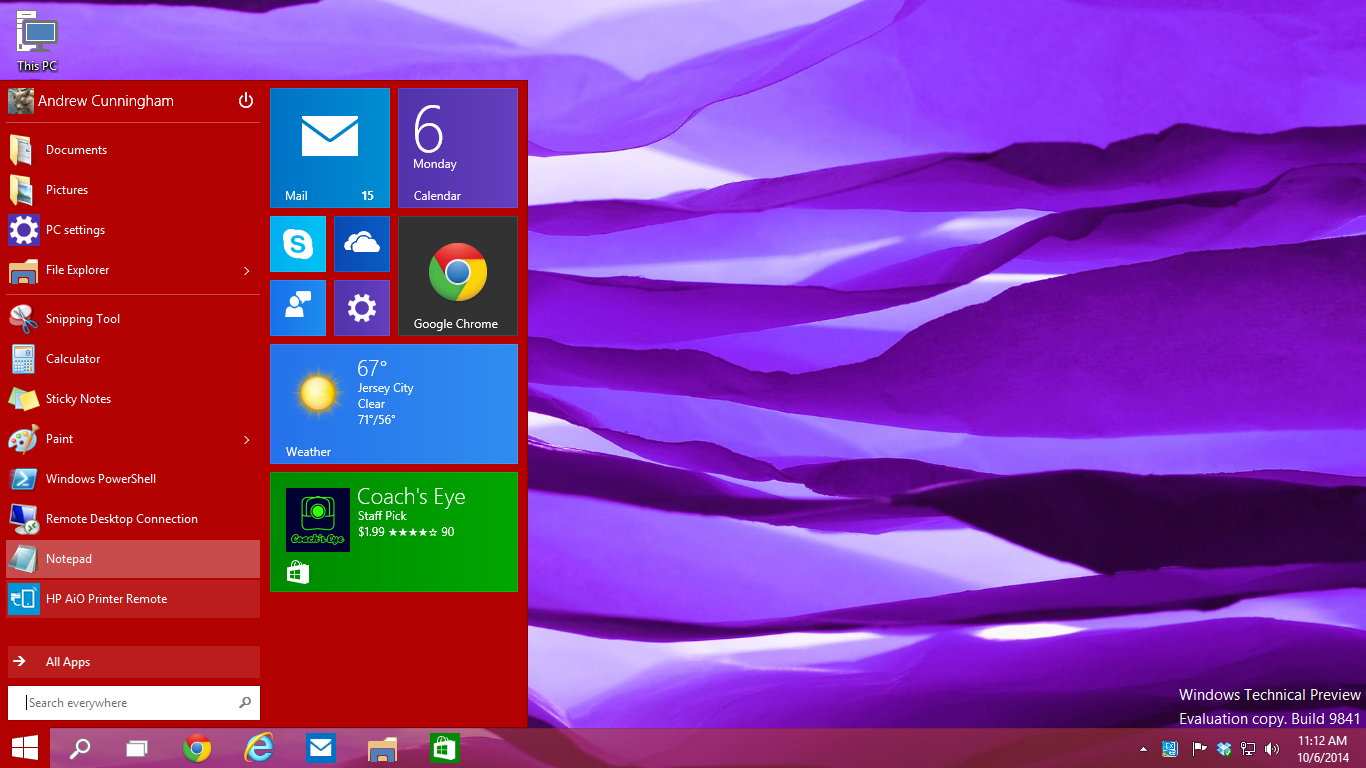
Windows 10 desktop
Windows 10 desktop and Start Menu (Photo courtesy of arstechnica.com and Andrew Cunningham)

Some of Windows 10’s new features will include automatically installed updates, a new web browser to replace Internet Explorer, and Cortana (Microsoft’s version of Siri). And the Start Menu seems to be returning to its more traditional form after being changed for Windows 8.

Got a topic you want me to blog about? A comment or suggestion? Let me know below!

-Paul

Go back

Your message has been sent

Warning
Warning
Warning
Warning

Warning.

What’s wrong with Windows XP?

Living dangerously can be exciting! That’s why some people love skydiving or rock-climbing. On the other hand, using Windows XP is dangerous, but not exciting. If you use a computer with Windows XP (or have a friend who does), this quick post is really important for you! (If you’re not sure, Microsoft’s amirunningxp.com website will tell you right away.)

Microsoft has ended support for Windows XP[1]. It’s a 12-year-old operating system, and this is a normal thing Microsoft does as it continues to introduce new versions of Windows. But it’s a big, big, BIG deal for people still using XP.

OS market share
Operating system market share as of June 2014 (Photo courtesy of netmarketshare.com)

Why is this a big deal? First of all, check out the chart to the right. 1 out of 4 computers still runs Windows XP (the green wedge of the pie). That’s a lot of people affected by this end-of-support date! So if you’re still a Windows XP user, you’re not alone.

So what makes Windows XP dangerous? Well, Microsoft (and Apple) regularly offer free updates for their operating systems that users can download or install. These updates are primarily help protect your computer from newly-discovered hacks, viruses, and other bad stuff out there. Microsoft will no longer be providing these security updates for Windows XP!

In other words, Windows XP computers will become prime targets for hackers, because there are so many computers still running it and the hackers know Microsoft will no longer fix vulnerabilities that are found. Microsoft patched about 100 XP vulnerabilities last year alone[2]. This year they will patch ZERO (again, this isn’t a mistake by Microsoft; it’s normal procedure).

So what should you do? Well you have two options:

Option 1: Install Windows 8 on your current computer. I DON’T RECOMMEND THIS, mainly because if you have Windows XP, your computer likely doesn’t have the power to handle the new operating system well, if at all. (It will also cost $119 or $199, depending on the version.)

Option 2: Buy a new computer. Look, I hate telling you to go spend money. But Windows XP isn’t safe to use anymore! My recommendation is to buy a new computer with a newer operating system included. Feel free to check out this great laptop buying guide from Walt Mossberg or my post last week on Macs vs. PCs.

Bottom line: you’ve got to move on from Windows XP for security reasons, but a newer computer and software will serve you well. 

If you want some danger in your life, I’d recommend skydiving or rock climbing instead of Windows XP.


What topics do you want to hear about? Submit your question or comment below!

Go back

Your message has been sent

Warning
Warning
Warning
Warning

Warning.

1 – Windows XP support ended April 8, 2014.
2 – According to http://www.sfgate.com/technology/article/Microsoft-to-end-Windows-XP-support-April-8-5298608.php.