My Life Without Cable

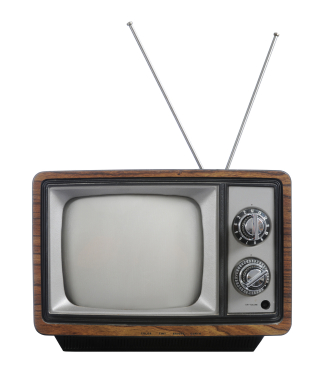
Old TV with rabbit ears
Remember when you WERE the remote control?

The first time I ever had cable TV was my freshman year of college. When I was growing up, our TV came through the finicky rabbit-ears on top of the TV. I’d watch shows on PBS and during the summer the FOX MLB Game of the Week (when I got my chores done in time). My TV experience changed dramatically in my freshman dorm room: SportsCenter in the morning, Tom and Jerry during my lunch break, and frequent Seinfeld reruns in the evening.

It’s easy to become accustomed to having such a variety of content available to watch at any time. Then I moved out on my own after college and, wow! I was hit by sticker shock when I saw how much even basic cable would cost me. I went to RadioShack (now out of business) and got my own rabbit-ears for my Indianapolis apartment.

My setup has changed since then. I’m not advocating going without a TV, although I admire that if you’re able. I’m talking about finding alternatives to cable. Most of them aren’t free. But I’m not burdened by a pricy monthly cable bill, and you don’t have to be either. Here’s how.

Over-the-air TV channels

When you think of a TV antenna, do you think of rabbit-ears sitting on top of the TV or a gigantic rooftop antenna that looks like it communicates with UFOs? Modern antennas are often much less unsightly than these. And if you live in or near a city, you can get some TV channels free…and in high definition if you have an HDTV.
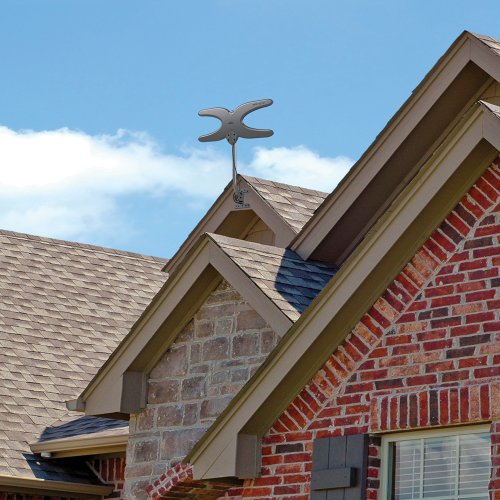
Mohu Sky 60 antenna
The Sky 60: certainly not invisible, but I think it looks a lot better than rooftop antennas of yesteryear.

I live about 50 miles from most of the transmitters in Indianapolis, so I’ve installed Mohu’s Sky 60 antenna. It’s designed to be outdoors or in an attic, but it’s far from an eyesore (in my opinion). It’s only about 3 feet high and maybe 1.5 feet wide. Since I’m near the edge of this antenna’s range, a few of the channels don’t come in cleanly, and this is made worse when storms move through the area. But we usually get FOX, CBS, ABC, and PBS in high definition, plus some secondary channels like 24/7 radar or oldies TV shows.
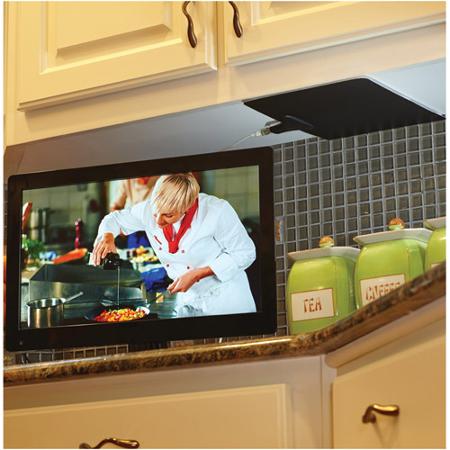
Mohu Leaf 30 antenna
The Leaf 30: very inconspicuous. Not sure why they didn’t install it with the white side facing out though!

For those of you who live closer to a city than we do, there are cheaper and less conspicuous options available. For example, Mohu’s Leaf 30 indoor antenna is about the size of a sheet of paper, only 1/16th in. thick, and can be painted to match its location. Its 30-mile range should be plenty for folks living in a city or suburbs.

I’ve had mixed results with reception at the edge of my antenna’s advertised range, but I’ve been impressed with Mohu’s customer support. There are certainly other options available for HD antennas as well.

Streaming options

If you’re a cable user, you probably have favorite shows on cable channels like History or ESPN. Well, you won’t be able to get those with your antenna. But there are ways to see many of those shows after they’ve aired.

The most common of these are streaming services Netflix and Hulu Plus. Both are monthly subscriptions, and they include episodes of current TV shows, shows that aren’t currently airing, and lots of movies. (We had Netflix for a while, but after some months decided we didn’t watch enough to justify our subscription.)

Other streaming services are also available, such as Amazon Instant Video (free to Amazon Prime members).

Roku 3
Roku 3 streaming media player

Streaming services are available directly through smart TVs or through streaming boxes like a Roku or Amazon Fire TV, which plug into your TV through an HDMI cable. Netflix and Hulu Plus are available through almost every smart TV or streaming box, but often you’ll find “channels” specific to a cable network, such as Fox News Channel. Some of these channels will require you to sign in with a cable provider, but others will let you watch recent episodes or clips for free.

Often you can also watch the most recent episodes of cable shows in full online after they’ve aired. You’ll have to keep up with them, because they usually only keep the few most recent episodes available.

Sling TV from Dish will stream certain cable channels for a monthly rate.
Sling TV from Dish

If you’re willing to pay more, there are more options coming in the months ahead for “cord-cutters.” HBO, a “premium” cable channel, recently announced it will soon allow people without cable to pay for access to its shows. In addition, Dish TV announced a new standalone service offering live streaming of cable channels such as ESPN, CNN, and Food Network for $20 per month.

Don’t forget discs

Remember when Netflix sent DVDs by mail? Well, they still do! You can sign up for a Netflix DVD or Blu-ray plan separately from a Netflix streaming subscription or along with one.

My wife and I rarely watch more than a few movies per month. For us, Redbox is also a nice option for one-night DVD rental. Redbox.com allows us to find a location nearby that has the movie we want in stock.

Free options

If going without cable is starting to sound almost as expensive as cable, don’t forget about great free options! Your local library should have plenty of choices of DVD and Blu-ray movies and TV shows available.

And of course there’s a good chance if you don’t own a movie, you might have a friend who does. We’ve often borrowed movies and TV shows from our friends, and vice versa.

Have you quit cable? What’s your setup like? Let me know below!

-Paul

Go back

Your message has been sent

Warning
Warning
Warning
Warning

Warning.

TV resolution – Television buying guide part 1

Family watching TV
A stereotypical family watching TV together…don’t they look like they’re having fun?

I recently heard from a reader in Boston who told me he and his wife are thinking about buying a new TV in the near future. What options are there in the TV market these days, he asked, and what should they look for?

The television market has seen a couple major shifts over the past decade or so, first from “tube” TVs to flat-panel LCD models (and high definition capability). Within the past few years, we’ve seen so-called “smart TVs” appear and become quite popular. It seems we’re starting to see another big shift that seems imminent: the arrival of “Ultra High Definition” TVs.

My wife and I are also thinking about a new TV, so I’ve been researching these options and I’ll break them down for you here.

This week, we’ll cover what to look for in TV hardware.

In part 2, we’ll look specifically at what smart TVs offer, and whether they’re a good choice for you.

In part 3, we’ll take a look at whether brand names are important, and I’ll give advice on how to find the best deals when TV shopping.

Let’s dive in!

A first warning!

TV wall in-store
Don’t compare the pictures among the TVs on the TV wall!

The first thing I want to mention (and I can’t stress this enough) is NEVER EVER UNDER ANY CIRCUMSTANCES choose a TV based on how the picture looks on the display wall at a store. NEVER!!!

Why? The lighting in the store is totally different than the lighting you’ll have in your house when you use it, plus the brightness, contrast, and other settings are cranked all the way up to make the TV wall as eye-catching as possible. You will never adjust the settings like that at home, so it doesn’t at all give you a realistic idea of what the picture will look like in your living room.

On the other hand, comparing options in person can be very helpful in other ways. For example, you get a good idea of how wide the bezel is (the frame around the edge of the screen) or how deep the body of the TV is. Plus, you can get a clearer perspective of how big a 32-inch or 65-inch screen actually is[1].

LCD vs. Plasma

The vast majority of TVs available today are LCD TVs. Plasma TVs are the main alternative, especially in larger screen sizes. Another description you’ll see often is LED TV. Let’s break those down.

An LCD TV weighs much less than a similar size plasma TV, is usually thinner, and typically uses less electricity. LCD screens also have less glare than plasma screens, so I’d recommend plasma screens only for people who will usually be watching in a dark environment. The main advantages of plasma TVs is that they have deeper blacks in the picture (again, great for dark rooms) and they’re usually a bit less expensive.

LED TVs are simply a newer kind of LCD screen, and LED TVs are lighter, thinner, and have deeper blacks than older LCD screens. If you happen to be comparing a TV that says “LED” on the box to one that just says “LCD,” the LED one is better. By now, almost all LCD TVs in stores use LED technology, so these terms are pretty much interchangeable.

For most people, I definitely recommend an LED TV[2].

Only look at a plasma TV if it’s going in a place where you’re always going to watch in the dark, and you don’t mind a heavier and bulkier TV.

3D or not 3D?

3D technology in TVs is fairly new, and it remains to be seen if it’s a lasting trend. My guess is it’s a fad. 3D movies are available, but more expensive, and 3D live television doesn’t seem to be catching on.

That said, I’ve only watched a 3D TV in a store, never someone’s living room, so it may be a much better experience than I know. Many high-end TVs include 3D capability anyway, so if you’re getting it, why not use it?

I advise you not to pay more for a TV simply to get 3D. If you do go with 3D, you’ll also need a 3D Blu-ray player and 3D movies, plus perhaps extra 3D glasses.

HD, but which HD?

Just about every single TV available today is a high definition TV (HDTV). However, there are different “levels” of HD, and they affect how much detail you can perceive in the picture[3].

720p HD is high definition, but it has the fewest pixels of the HD sizes — in other words it shows less detail than the others. Many smaller TVs are 720p HD, but as I’ll explain in a moment, that’s not necessarily a bad thing.

1080p HD is also known as “Full HD,” and it’s the next step up from 720p. Until the past year or so, it was the best resolution you could buy, and it’s still the most common format you’ll see in stores.

TV resolution chart
This chart will help you see whether you’ll notice the difference between HD resolutions, depending on your screen size and distance from the TV. Click to enlarge. (Chart courtesy of Carlton Bale)

Whether you’ll notice a difference between 720p and Full HD depends on the size of the screen and how far away from it you sit. The chart to the right is from a very detailed article by Carlton Bale. From 10 feet away (the distance I’m guessing is in the average living room) your eyes probably can’t see the extra details of Full HD on screens smaller than about 50 inches. If you sit closer than that or watch a bigger screen, you’ll start to notice more detail in Full HD.

The newest level of HDTVs is “Ultra HD” (often also called “4K”). These TVs can show even more detail than Full HD, but again the difference you see depends on your screen size and distance from it. As the chart above shows, at 10 feet away from the TV you’ll need a screen larger than 75 inches to start noticing the difference between 4k and 1080p.

Plus, at this point, it’s still hard to find content to watch in Ultra HD resolution, and Ultra HD TVs are still very expensive. I think Ultra HD is the way of the future, but it’s a future that’s at least a couple years away. Don’t buy a 4K TV yet.

Bottom line: for TVs 50″ or above in a typical living room, make sure you’re getting a 1080p (a.k.a. Full HD) TV. For smaller TVs, 720p should be fine, but 1080p won’t hurt.

The right connections

HDMI port on a TV
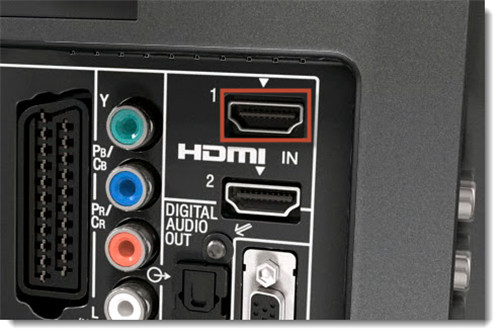
HDMI port on a TV (in the red box)

The other main thing you’ll want to look for in TV hardware is connections. HDMI is the most common and highest quality connection, so make sure you have enough HDMI ports for all the peripherals you have or might get (such as Blu-ray player or Xbox). If any device can connect to the TV with an HDMI cable, do it. So the more HDMI ports the TV has, the better.

A USB port can be handy for viewing photos on a USB thumb drive. Also, if you have a standard definition device like a DVD player that connects via another connection (such as red, white, and yellow component cables), make sure the TV has those connections as well.

Next week: Smart TVs

The outside of the TV isn’t the only part getting changed lately — the insides of many TVs have also been undergoing a serious overhaul.

I’m referring to “smart TVs,” and next week I’ll explain what they are and whether you should get one. Stay tuned!

-Paul

Let me know below if there’s a topic or question you’d like me to tackle next!

Go back

Your message has been sent

Warning
Warning
Warning
Warning

Warning.

1 – TV screen size is measure diagonally from corner to corner. So if you’re trying to visualize how big a TV will be in your living room, break out the tape measure and hold it diagonally across the rectangle you’re visualizing. Make sure to add an inch or two for the bezel around the screen.

2 – One other option you may see is OLED screens, which are currently only found in a few high-end TVs. These combine the best of LED and plasma TVs, but they’re at least a few years away from being affordable for the average family.

3 – I need to point out that the detail you can see if affected by both the source and the screen you are viewing it on. For example, DVDs are NOT high definition picture quality, so if you watch a DVD on a high definition TV, the TV can’t show an HD picture — it won’t be showing all the detail it’s able to. The same is true with cable or satellite if you don’t have an HD subscription. On the other hand, if your source is HD, such as a Blu-ray movie, you can only see its high definition details if your TV is an HDTV.