Deal or no deal: scratch-and-dent and open-box items

A really bad gadget
Who really wants a fan, speaker, and microphone all in one product? (Photo courtesy of bgr.com)

Christmas has passed once again, and many of us will be heading back to stores to try to return gifts that just aren’t quite what we were hoping for. (Although the gift you’re returning probably isn’t as bad as this one.)

A lot of those items, if opened, can’t be put back on the shelf with their unopened brethren, so they become open-box items. Open-box items (and those with similar labels like “scratch-and-dent”) are taking up shelf space the retailer wants to use for newer products. So you can usually get a significant discount, and perhaps even the chance to haggle.

You’ll see more and more open-box items as you walk around stores over the next few weeks. Clearance, open-box, scratch-and-dent, floor model…what do these terms mean, and how do you know if you’re really getting a deal? Read on.

What’s in a name?

As Shakespeare once said, “…a rose by any other name would smell as sweet.” Well, it may be true for roses, but not necessarily for discounts.

The meanings of these terms often vary from retailer to retailer. So it’s best to clarify with a sales associate exactly why a particular item you’re looking at is being discounted. There are four main categories, regardless of what each store calls them. I’ll detail each below, along with what “gotchas” to look out for in each category.

Clearance

The most straightforward (usually). Clearance is a pretty universal term for items that are no longer being shipped to the stores by the manufacturer (usually because a newer model has been released). The product has never been opened, but just isn’t the latest and greatest model. This is ideal for products that you don’t replace often or without frequent innovation (laptop case, headphones, washing machine, etc.).

For bigger purchases, I’d recommend checking online to see when that particular model was released. Clearance items are usually at least a year old. I’d be more cautious buying clearance items in categories that change a lot from year to year, such as computers or cell phones. Clearance items have the same warranty and return window as non-clearance items, so this can be a great deal if you’re willing to get a year-old product (but new to you!)

Floor model

Floor model items often aren’t labelled as such; sometimes they’re simply called “Open-box”. Sometimes you can tell an item is a floor model because it has no box and has the manufacturer’s stickers on it pointing out features. I would always ask to make sure that is indeed the reason for the discount.

This is basically a product that has been used as a display in the store. Once the store needs that display space for a newer model, the display is often sold. This means the product has usually been on clearance, and has now sold out in the store.

So my advice on floor models is very similar to my advice on clearance items, but with a couple additional caveats.

First, consider the way the floor model has or hasn’t been used while on display in the store. For example, items like speakers or TVs are often on at all times the store is open. If the TV has been on display for a year, that’s probably close to 4,000 hours the TV has already been used by the time you take it home. That’s probably more than you’ll use it during your first three years with it!
Our Electrolux vacuum
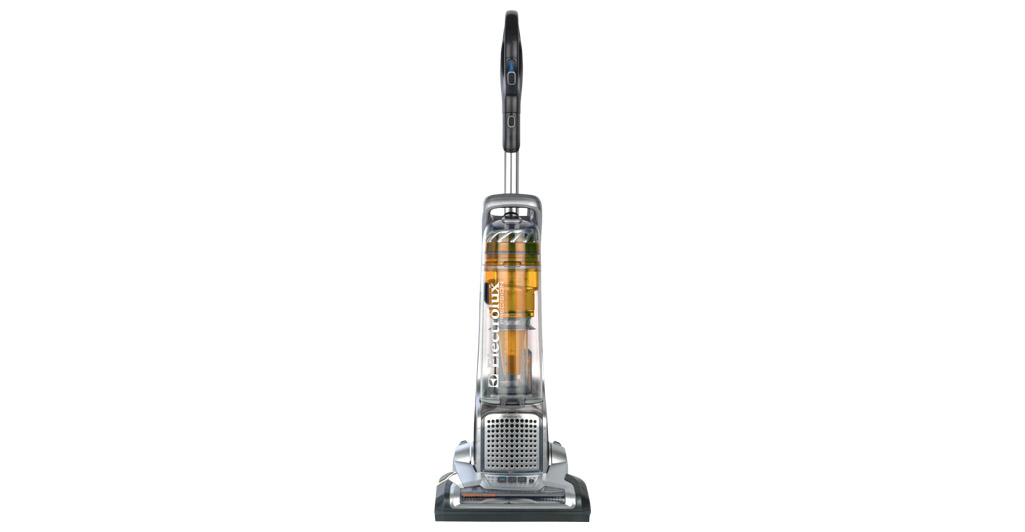
This was a great deal for us at 60% off. (Photo courtesy of Electrolux)

On the other hand, my wife and I bought a floor model vacuum recently for 60% off the original price. After looking in the vacuum aisle, I realized there were no outlets nearby, so I doubted this particular Electrolux vacuum had been operated much, if ever. In addition, I confirmed with a sales associate that their floor models had the same return policy as new items. We bought it, and have been extremely satisfied so far.

Second, make sure that you check as I did to make sure of the return policy. Since the product has been on display for months, there may be no box and you may find other parts missing or not working when you get it home to use it. For example, floor model TVs sometimes have missing remotes.

Open-box

There can be some overlap between open-box items and scratch-and-dent items (the category below). When I refer to open box items, I’m thinking specifically of items that have been opened and returned, but have no visible damage.

Products are returned for all kinds of reasons, and most of the times sales associates have no way to tell you what the reason was for the return. This time of year, many products are returned not because of any defect, but because they simply didn’t quite meet the needs of the gift receiver. Maybe the Bluetooth speaker wasn’t loud enough, or was blue instead of red. You get the idea.

Sometimes the product is returned because the quality isn’t satisfactory or there’s a defect of some sort. Instead of contacting the manufacturer to solve the problem, it’s easier to simply return it to the store. And so these problems can pop up in open-box products on the shelf.

I recommend two things. First, check the ratings and reviews on the product. This will usually tell you if the product is usually of quality construction, or if there are common flaws people are noticing after purchase. Second, check on the store’s return policy. (Sound familiar yet?) If there’s a problem you didn’t notice in the store, you’ll want to be able to return it.

Scratch-and-dent

By scratch-and-dent, I refer to items that are discounted because of physical damage or cosmetic defects. This damage or defect shouldn’t affect the function of the product, otherwise it shouldn’t be for sale and you shouldn’t buy it. Most often, this appears in the form of a scratched refrigerator that was damaged in transportation, or some similar scenario.

First, talk to an employee to verify exactly what damage is causing the discount, and make sure it is documented on paper. If you have to return the item for some reason, you’ll need to be able to show that every bit of the damage was there when you bought it.

Second, check to make sure that the damage isn’t inhibiting any normal functions of the product.

If you’re satisfied with both of those checks, then the only question is whether you are willing to live with seeing the cosmetic damage on a regular basis. If the damage is to a side of the product that won’t be visible, all the better! If you’re willing to accept cosmetic damage, you can get fantastic discounts on great products this way.

Final thoughts

If you haven’t yet picked up on this theme yet, double-check with a sales associate or manager to make sure of the return policy before you plunk down your money.

For obvious reasons, all of these items (except clearance) won’t have the same inventory from store to store. Some stores (like Best Buy) have begun allowing you to search their open-box inventory online, specifying by stores near you.

Do you have a topic idea for me? Let me know below!

-Paul

Go back

Your message has been sent

Warning
Warning
Warning
Warning

Warning.

Extended Warranties: to Buy or Not to Buy

Extended Warranty seal
Are extended warranties worth buying? (Photo courtesy of skydenelectronics.com)

A reader from Peoria, IL asks, “What is the rule of thumb for when to buy a warranty for your electronics purchase?”

That’s a great question. I have some personal experience in this area, because I worked in sales for a large electronics retail store not too long ago. Extended warranties were one of the things we offered customers (and were told to offer to every customer making a major-ish purchase).[1]

Electronics retailers make a very high profit margin on extended warranties, which is part of the reason many people with whom I talked were very skeptical of extended warranties.

I personally don’t think you should avoid extended warranties just because retailers make a profit on them. After all, it’s a very similar business model to the one insurance companies use.

However, I do think you should avoid extended warranties, and here’s why:[2]

Why NOT buy an extended warranty?

Overlap in coverage: The extended warranty starts day one, not after the manufacturer’s warranty expires. If the manufacturer’s warranty lasts one year and you buy a three-year extended warranty, you are actually getting two extra years of coverage, not three. Similarly, if you buy a plan that covers accidental damage, it will also cover product defects, which were already covered by the manufacturer. Why pay for coverage you already have?

Products don’t usually break during the extended warranty window: Consumer Reports’ research indicates that products are most likely to break either during the manufacturer’s warranty or long after the extended warranty has expired. (Not the day after the warranty expires, as some believe.) So IF the product has problems before the end of its expected lifespan, it will most likely be during the first year.

Your credit card might cover you: Some credit cards will extend the manufacturer’s warranty past it’s original expiration. American Express is best known for this, but other cards may have similar benefits. Check the fine print on yours.

Here’s what you should do instead:

Find out how much the extended warranty would cost you, and put that amount of money aside into a dedicated electronics repair fund. After doing this for a few purchases, you’ll probably already have enough saved to cover an unexpected repair or replacement out-of-pocket – and without purchasing an extended warranty. In other words, you are your own insurance plan.

This plan of action may not be easy to implement and keep up, but it’ll allow you to sleep easier at night without spending money on an unnecessary insurance plan.

Leave a question or comment below! Thanks!

Go back

Your message has been sent

Warning
Warning
Warning
Warning

Warning.

1 – Every product comes with a manufacturer’s warranty, generally anywhere from 90 days to 2 years. On major items such as TVs, computers, PlayStations, or cameras, the most common manufacturer’s warranty lasts 1 year. Manufacturer’s warranties essentially cover problems that are the manufacturer’s fault: manufacturing issues, defective parts, etc. Extended warranties are offered by a third party (examples include Best Buy’s Geek Squad Protection, and SquareTrade, which sells their extended warranties online). These typically cover the same things as the manufacturer’s warranty, but may cover other things such as accidental damage. The main distinction is that they last longer, up to 5 years (depending on the product covered).
2 – I based some of my ideas on two different resources: Consumer Reports and U.S. News and World Report

Backing up your computer

I’d known my computer longer than I’d known my wife. That MacBook and I had typed school papers and edited videos together. It stored everything from the invitation for my 14th birthday party to my wedding photos. And one day last July, it just wouldn’t turn on.

It turned out the issue was in either the power supply or the motherboard. Bad news because it meant we needed a new computer. Good news because the hard drive was unaffected. We were able to transfer everything on the hard drive to our new computer.

That’s when I realized first-hand the importance of backing up my computer. I hope you haven’t learned that lesson the hard way. If you haven’t, now’s the time.

According to one study, 1 in 20 hard drives fails within the first year-and-a-half of use. After three years, more than 1 in 10 have already failed.[1] What would you miss if you lost all the files on your computer? Don’t risk it!

computer on fire
If your computer is destroyed in a fire, you probably won’t be home. Offsite backups!

Offsite backups

Now that you know the importance of backing up your computer’s hard drive, here’s one more factor that’s extremely important: offsite backups. If your backups are stored on an external hard drive sitting on the same desk as your computer, it’s protecting you against hard drive failure. But if your computer is destroyed by something like a flood, fire, or tornado, that external hard drive is gone, too.

So always keep a copy of your backups in a separate location from your computer! In my case, I have one backup hard drive at home and one in my office. Every week or so I rotate them, so my offsite backup is never more than a week old. You may have another place that makes sense to store a copy (safe deposit box, relative’s house).

Today I’ll help you decide what type of backups work best for you and what hard drive and/or software you’ll need. Next week we’ll talk about how to actually put your backup plan into action!

Buying an external hard drive

The main way to backup your computer is to buy an external hard drive and plug it into your computer when you want to create a backup copy.[2] You have a copy of your files right there in your hands, but you have to remember to plug in the backup regularly and find an offsite location for it.

How much space do you need on your external hard drive? Short answer: at least as much space as your computer’s hard drive has, and preferably double it (more space never hurts).

hard drive capacity in Windows
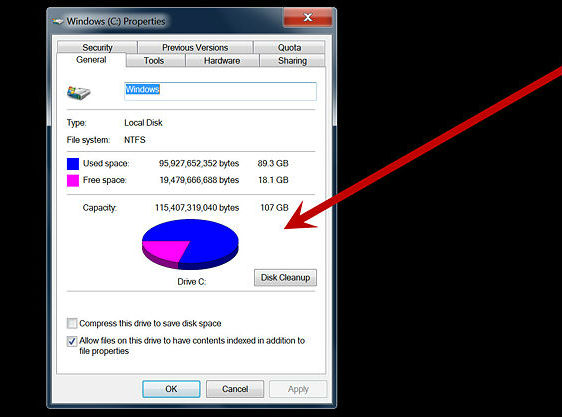
Hard drive capacity in Windows (Photo courtesy of wikiHow)

For Windows: To find your hard drive capacity in Windows 8, open File Explorer[3], right-click on “This PC” on the left side, and click “Properties.” In Windows 7, click the Start button on your desktop and click “Computer.” Right-click on “Local Disk” near the top, and click “Properties.” The Properties window will show your total capacity in gigabytes (GB), as well as how much is used.


Hard drive capacity on a Mac

On a Mac: click the Apple logo in the top-left corner of your screen, and click “About This Mac” in the drop-down menu. In the little window that pops up, click “More Info,” then click the “Storage” tab along the top of the window.

Where to buy

You can find an external hard drive at a local place like Best Buy or at an online store like Amazon. It will connect to your computer with an included USB cable. Again, you’re looking for at least double the capacity of your computer’s drive. Here’s a conversion you will probably need: 1 terabyte (TB) equals about 1,000 GB. A 1TB external drive is around $70 right now. WD, Seagate, or Toshiba are popular and comparable brands.[4]

I hope you’ve realized the importance of backing up all the valuable information you have stored on your computer. Come back next week as I show you how to actually set up your backup software (which is included with your computer). You’ll see that the backups are very easy to do once you’ve initially set up the software.

In the meantime: homework! Go get a hard drive so we can set it up next week.

As always, send me any questions you have or topics you’d like me to talk about. And click the buttons at the very bottom to share this post with someone who might need it. Thanks for reading! See you next week.

Go back

Your message has been sent

Warning
Warning
Warning
Warning

Warning.

1 – Full disclosure: Backblaze, the company that authored this study, offers cloud backup plans.
2 – Another option is “cloud” backups. Two of the more popular options in cloud backups are CrashPlan and Backblaze. This site has a more detailed explanation.
3 – Open File Explorer by swiping in from the right edge of the screen, tapping Search (or if you’re using a mouse, pointing to the upper-right corner of the screen, moving the mouse pointer down, and then clicking Search), entering File Explorer in the search box, and then tapping or clicking File Explorer.
4 – If you have a Mac, you don’t necessary need a drive labelled “For Mac.” They’re typically more expensive, but are ready for your computer out-of-the-box. A non-“For Mac” drive can be quickly formatted to work on a Mac, so decide whether you want pay a little more for a drive pre-formatted for your Mac.