Google Chromebook: Is It For Me?

Welcome to the first of a recurring series here on my Making Technology Simpler blog: “Is It For Me?” I’ll explain a product or technology, then help you figure out if it meets your needs. This week’s subject is the Google Chromebook.
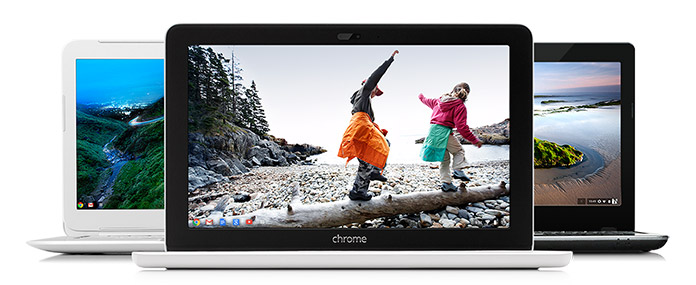
Chromebook laptops
Google Chromebooks (Photo courtesy of google.com)

Google Chromebooks are a series of inexpensive laptops with great battery life, strong integration with Google, and little maintenance needed.

Chromebooks use an operating system created by Google called Chrome OS…the whole operating system is basically the Chrome Internet browser that many people use on Windows and Mac computers. The computer hardware is made by companies like Acer and HP.

Pros

Here’s another thing that makes Chromebooks unique among laptops: the whole operating system is designed to be used with Internet access, and the hard drive in the computer is tiny.

Google intended for these computers to be used in conjunction with Google’s cloud storage, so photos will need to be stored in Google+ and documents stored in Google Drive. (I wrote about cloud storage here.) With everything stored in the cloud, there’s no need for a big hard drive. The benefit of this is the computer will boot up very quickly.

This reliance on cloud storage has a couple other ramifications. On the positive side, no data backups are needed, since almost everything is in Google’s cloud. And once the computer needs to be replaced, you can sign into your next Chromebook with your Google account, and all your emails, documents, etc. will be available immediately. No file transferring necessary.

Cons

On the flip side, you will be limited in what your Chromebook can do without Internet access. You can do some document creation, for example, and the document will save to Google Drive when you connect to the Internet again. Internet access is becoming more widespread, however, and some Chromebooks will allow you to also connect to a 4G network through a carrier like T-Mobile.

Because almost everything you do on a Chromebook involves Internet access, the speed of the computer itself will be heavily influenced by the speed of your Internet connection. If you regularly use a slow connection, be prepared to pay for faster speeds to really enjoy a speedy Chromebook experience.

The other main limitation of Chromebooks is that you can’t install PC or Mac programs on it. So if you really need the full version of Microsoft Office or some specialized accounting program for your work, a Chromebook isn’t for you (unless it’s as a secondary computer). You’re limited to using Google’s apps and others available through the Chrome web store.

Ease of use

Chromebooks are low maintenance devices, partly because they update automatically and Google says they’re very secure and have no need for antivirus software.

Setup is also easy, to the degree that you’re already part of Google’s services. If you already use Google for email, documents, photos, and music, your new Chromebook will be ready to go as soon as you open it and sign in with your Google account.

If you use iTunes for your music and store documents or photos on your current computer, you’ll want to transfer all of it to Google’s appropriate online service before you make the switch to a Chromebook. (And if you have an iPhone, iPad, or iPod, know that they won’t sync with music on your Chromebook.)

Remember, third-party apps like iTunes or Microsoft Office can’t be installed on a Chromebook. So you’ll need to use a Google service or a third-party service that can be accessed online (such as Pandora for music streaming or the online version of Microsoft Office).

Is it for me?

A Chromebook might be great for you, if:

  • You use Google for all of your email, documents, photos, media, and calendar (or are willing to move all those things to Google)
  • You have Internet access almost all the time
  • You need a very portable computer with a battery that lasts all day
  • A low up-front cost is important to you

You should probably stay away from a Chromebook, if:

  • You need an application that only runs on a PC or Mac, like Adobe Creative Cloud, Microsoft Office, or iTunes
  • You prefer to store your documents, photos, or media locally (i.e. on your computer’s hard drive)
  • Your computer needs to handle intense tasks, like games or video editing

Have you seen or heard about another device or technology that’s made you ask, “Is it for me?” Let me know below, and I’ll write about it soon.

-Paul

Go back

Your message has been sent

Warning
Warning
Warning
Warning

Warning.


Brands and deals – Television buying guide part 3

Note: this is the third and final part of my TV buying guide, 2014 edition. In the first part, I talked about high definition options and 3D. In the second part, I discussed the pros and cons of smart TVs.

As I mentioned in last week’s post, if you’re buying a smart TV, make sure the user interface is easy-to-use and all the apps you want are available. You’ll want to try out your options in person, like in a store or at a friend’s house. As you do, I think you’ll find that the brand name makes a big difference.

The importance of the brand

The biggest brand names in the TV market these days are Samsung, LG, and Panasonic. These four brands make up the vast majority of Consumer Reports’ top 2014 TV sets.

Sony and Sharp are also very popular TV brands. Vizio is a newer, American brand that’s become popular by offering TVs with premium features with a lower price tag.

There are a few names, such as RCA, Philips, or Westinghouse, that are recognizable but still definitely budget options in the world of TVs. Other budget options include store brands, such as Best Buy’s Insignia line, and newer Asian brands, like Hisense and Seiki.

So what’s the difference between them?

In general, the picture quality of your TV depends more on the settings you select in the menu than the manufacturer of the TV. In fact, the LCD panels in many off-brand TVs are actually manufactured by big names like Samsung.

You’ll probably find that the menus and settings options are easier to use and understand on the higher-end brands. For example, many of their TVs come with “picture modes,” which can adjust the settings to various presets. I’d recommend looking for a Cinema or Movie mode.

If you’re upgrading from a TV that’s more than 5 or so years old (and especially if it’s the old tube-style CRT TV), you’re likely to see an impressive improvement in picture quality with a new TV from even the cheapest manufacturer.

When it comes to smart TVs, though, the brand name can make a HUGE difference. This is because the quality of your experience depends largely on the software the manufacturer has designed for the TV. The ease of navigation and search, plus the pleasantness of the visual layout, are very different between a top brand and a budget brand. There are certainly exceptions, which is why I recommend trying before you choose.

Looking through Consumer Reports’ 2014 TV ratings, there’s definitely a pattern: Samsung has by far the most recommended models (32), with Panasonic (18) and LG (12) coming in next. Sony (6), Vizio (4), and Sharp (4) are the only others with multiple recommended models. That’s pretty top-heavy, and if you know Consumer Reports, you know they don’t recommend products based on brand name but rather on testing the product itself.

Samsung logo
Samsung gets my recommendation for best TVs.

In my limited experience, Samsung also leads the pack in smart TV features and ease-of-use. (Again, take that with a grain of salt and try them for yourself.)

Samsung is easily my top recommendation for a smart TV.

When to buy?

The most advertised TV sales are almost certainly during the week leading up to the Super Bowl and Black Friday. According to Consumer Reports, the best times to buy a TV include January (pre-Super Bowl) and November (Black Friday), but also March and December.

Black Friday line at Best Buy
Black Friday shoppers wait in line at Best Buy

Why? December coincides with holiday shopping and the related sales. March is actually the time of year when many TV manufacturers release new models. So if last year’s model will suit your needs, you may be able to find the best deal in March (if you get to your choice before it sells out). Plus, you won’t have to wait in a crazy line for hours.

Keep in mind, though, that there are sales all year round, and if your research reveals a particular model that fits your needs and budget, you probably won’t have to wait months to find a deal on it. There are websites that can track the price of a certain product and notify you when it goes on sale.

Extended warranty?

Whether you buy in a physical store or online, you’ll more than likely be offered the chance to purchase an extended warranty or protection plan. I’ve previously discussed why I don’t feel these are worth adding on to your purchases, and my thoughts are no different on TVs. In fact, Consumer Reports’ research shows that most TVs encounter problems within their first year, or not until the end of their lifespan. The manufacturer’s warranty should be enough for you.

Deeper discounts available?

I mentioned earlier the best times of the year to get great TV deals, including March, when last year’s models go on clearance. Even deeper discounts can often be found in open-box items.

If you’re thinking about getting an open-box TV, make sure to check whether it was purchased and returned, or a floor model. If it was purchased and returned, feel free to buy it after checking the store’s return policy. The customer might have brought it home only to find it was too small or the wrong style for his living room. If by chance he wasn’t happy with the quality of the TV, you should have a chance to try it and return it if you’re not happy. With TVs, most manufacturing problems will be noticeable right away.

On the other hand, stay away from floor model TVs. The bulbs in a TV have an expected lifespan, and that floor model was probably running on full brightness for at least 12 hours a day, 7 days a week. Even with LED TVs, whose bulbs should last a long, long time, that’s a lot of time those bulbs have already been burning by the time you bring the TV home.

Final thoughts

  • As I mentioned in part 1 of this buying guide, look for an LED TV that’s 1080p HD if your screen size will be around 50″ or above. 720p is fine if your screen is smaller than that.
  • Make sure it has enough ports for what you’ll connect, especially HDMI ports.
  • In part 2 I explained why I’m skeptical of smart TVs’ longevity, but the newest and best TVs are all smart TVs. If you go with a smart TV, make sure to get a top brand with an interface that’s easy to use.
  • Speaking of brands, Consumer Reports shows Samsung to be the best overall manufacturer, and LG or Panasonic look to be your other top choices.
  • Avoid extended warranties and floor model discounts, but a great deal can be found in a clearance model from last year or a returned open-box TV.

Let me know if this helped. If you have other questions, please ask me below!

-Paul

Go back

Your message has been sent

Warning
Warning
Warning
Warning

Warning.

Smart TVs – Television buying guide part 2

Note: this is the second part of my TV buying guide. The first post discussed TV resolutions and connections.

If you’ve been shopping for TVs lately, you’ve come across the term “smart TV.” So what’s a smart TV? It’s a TV that connects to the Internet and allows you to watch content from online: movies from Netflix, TV shows from Hulu, or (my guilty pleasure) YouTube compilations of cats falling clumsily.

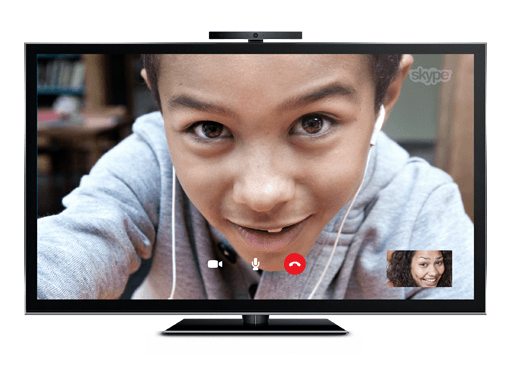
Skype on a smart TV
Your family can literally be larger than life with video calls on a smart TV

The fact that the TV is connected to the Internet also allows for more unusual uses, such as Skyping with an attached webcam or listening to music through your surround sound speakers with an online music service like Pandora.

These activities used to be relegated to your computer. Now you can enjoy them in your living room on the biggest screen in your house. It’s fantastic to have those abilities.

But I’m still not sure my next TV will be a smart TV. And here’s why.

A potential downside: longevity

Ever since televisions were invented, they served as passive screens simply displaying the video signal fed into them. The video signals came from devices such as antennas, then cable and satellite dishes, then VCRs and DVD players.

A smart TV is different; it’s essentially an all-in-one computer, like an iMac. There’s a small, streamlined computer housed behind the screen, connecting to the Internet and serving you content from various online sources. It works well, and frankly I’ve been pretty impressed by how it works on demo units I’ve seen in stores.

But how long will that computer, and the “smart TV” experience it provides, feel quick and modern?

My suspicion is that the TV’s computer “guts” will feel slow and the software will feel outdated long before the TV screen itself seems inadequate. (This is the same reason I’m skeptical of cars with a built-in screen and computer system.)

Now, it could be argued I’ve kept using my current TV longer than the average person…but I doubt it. I won’t embarrass my parents by publishing exactly how old their TVs are, but both are much older than their computer. I suspect the same is true for most people.

If you tend to get a new TV every few years, this may not be much of a problem for you. But for those of you who don’t, there are other options for accessing online content.

Another option: streaming boxes

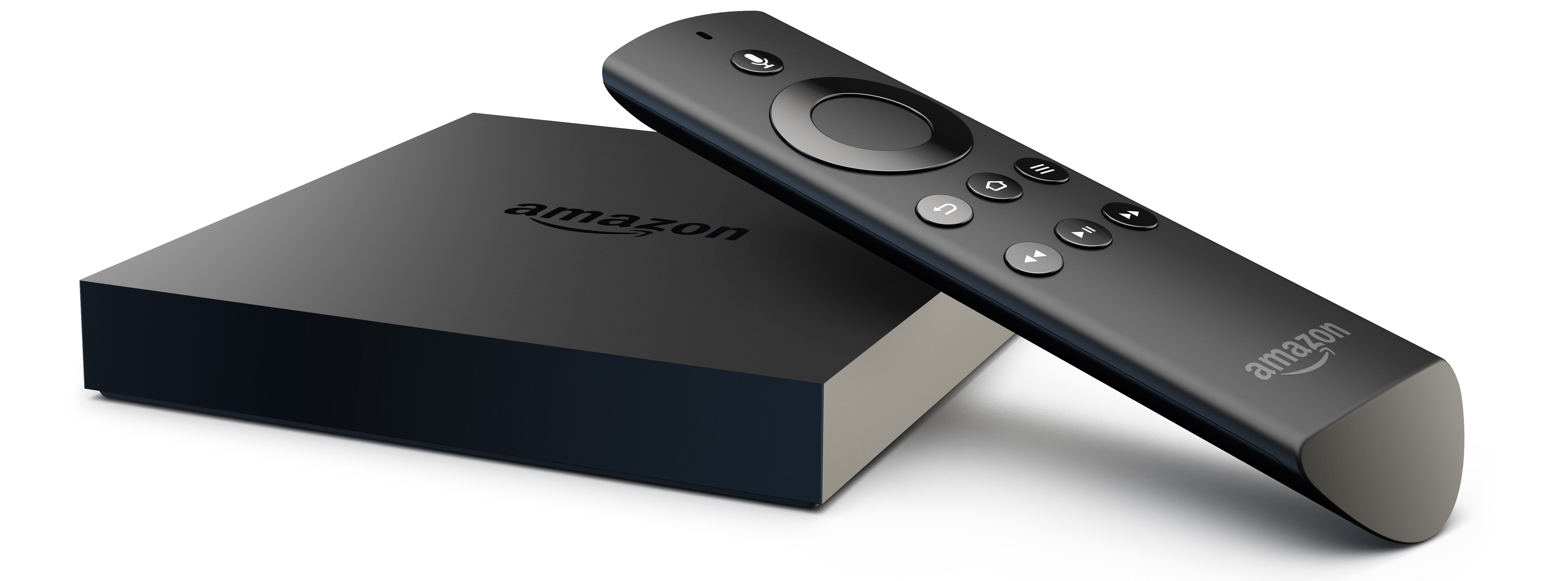
Amazon Fire TV
Amazon’s new Fire TV streaming box

In fact, you may already own a device that can access online content. I’m thinking primarily of streaming boxes, such as a Roku, Apple TV, Fire TV, or Chromecast. Gaming consoles such as a Playstation or Xbox also have some streaming connectivity, and so do many Blu-ray players. And of course, your laptop might also able to connect to your TV when you want to watch something on it.

The benefit of a smart TV over these is simplicity (in theory). Instead of connecting another box and having another remote, it’s built into the TV itself. The ease of use may vary widely, depending on the TV manufacturer and the software it makes (more on that later). But in general, it means one less box to connect, one less cable to plug in, and one less remote to keep track of.

However, streaming media boxes such as a Roku or Apple TV cost $100 or less, and the Google Chromecast costs only about $35. I can live with having to replace one of those with the latest version every few years. I don’t see myself replacing my whole TV that often.

My worry is that when the computer components of your smart TV are out-of-date, you’ll be left with a screen that still works great. You’ll have three options: buy a new smart TV, use your smart TV with its slow or frustrating interface, or buy one of the aforementioned streaming boxes to do what your smart TV no longer can…which is exactly the thing you were avoiding by buying the smart TV in the first place.

That’s why I won’t be paying extra to get a smart TV. A dumb TV will still allow me to plug in my antenna, Blu-ray player (which streams Netflix, YouTube, etc.), and even my computer if I want.

If you don’t use or plan to use streaming video services, then a smart TV would probably be just adding an extra layer of complexity to your living room relaxation.

That being said, you rarely have the choice between a smart TV and a “dumb TV” these days. At the more expensive end of the TV market, almost every single TV is a smart TV. If you’re getting a TV above $1000, it will almost certainly be a smart TV, and even most TVs above $500 are smart TVs now.

Even if you don’t plan to use smart TV features, there’s a good chance you’ll end up with one, and you might be surprised how much you enjoy some of the features on it.

What to look for

So what separates one smart TV from another? The apps that are available and the televisions’ ease of use.

Samsung app store
Samsung’s smart TV app store

Almost every smart TV includes Netflix support, but if you want to use other streaming services or social media, make sure all those apps are either pre-installed or available through the manufacturer’s app store. If you want to use your new big screen for video calls, see if there’s an included camera or if you’ll need to connect a webcam on your own. Most smart TVs connect via Wi-Fi, but make sure yours does, because you probably won’t want to run an ethernet cable to it to provide Internet access.

The other big question: how easy-to-use are the smart services? A smart TV that’s frustrating to use defeats the whole purpose. If you stream content from multiple Internet services, see if the TV will show you results from all the services when you search for ‘Forrest Gump.’ Does the menu feel cluttered, or is it easy to find the app you’re wanting to use?

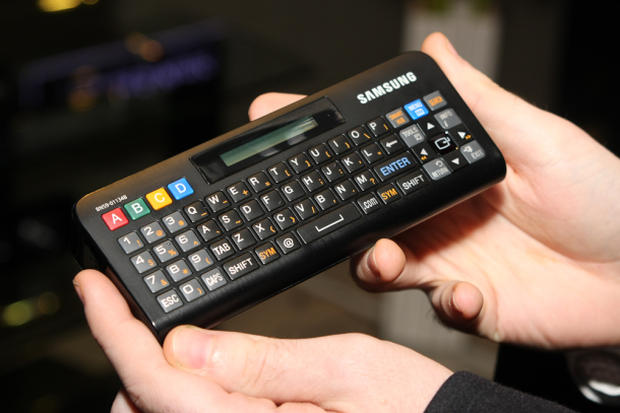
Samsung QWERTY remote
An example of a QWERTY remote

A key factor in ease-of-use is the remote. A full QWERTY keyboard on the remote will help you search much more quickly. Newer smart TVs come with remotes that let you move an on-screen pointer by aiming the remote at the screen (a la the Wii remote). Are there shortcut buttons on the remote for the streaming services you’ll use most often?

Conclusion

LG smart TV interface

Differentiating between smart TVs is difficult to do unless you’re using them in person. If you’re looking at the latest and greatest sets, the manufacturers’ websites may give good demos of their smart TV features. For last year’s models or budget brands, you’ll probably need to try out the smart TV at a friend’s house or in a store.

Think of smart TVs as an all-in-one computer, one with an operating system you’ve never used before. You shouldn’t buy just based off the screen size and quality; you’ll want to see how it actually functions first.

In short, I don’t recommend you pay more for a smart TV, if a dumb TV model fits your budget and suits your needs. But if you do get a smart TV, make sure you’re getting one that’s easy to use and has the apps to meet your viewing habits. That will probably mean looking for a model from a top brand.

Speaking of brand names, next week’s post will cover which brands to look for, and how much brand name matters. Plus, what time of year is best to buy a TV, and more!

-Paul

Got an idea for a future blog topic? Send it to me below. Thanks!

Go back

Your message has been sent

Warning
Warning
Warning
Warning

Warning.