My Life Without Cable

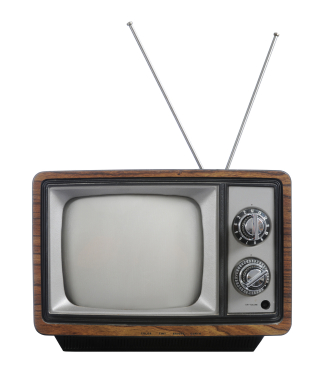
Old TV with rabbit ears
Remember when you WERE the remote control?

The first time I ever had cable TV was my freshman year of college. When I was growing up, our TV came through the finicky rabbit-ears on top of the TV. I’d watch shows on PBS and during the summer the FOX MLB Game of the Week (when I got my chores done in time). My TV experience changed dramatically in my freshman dorm room: SportsCenter in the morning, Tom and Jerry during my lunch break, and frequent Seinfeld reruns in the evening.

It’s easy to become accustomed to having such a variety of content available to watch at any time. Then I moved out on my own after college and, wow! I was hit by sticker shock when I saw how much even basic cable would cost me. I went to RadioShack (now out of business) and got my own rabbit-ears for my Indianapolis apartment.

My setup has changed since then. I’m not advocating going without a TV, although I admire that if you’re able. I’m talking about finding alternatives to cable. Most of them aren’t free. But I’m not burdened by a pricy monthly cable bill, and you don’t have to be either. Here’s how.

Over-the-air TV channels

When you think of a TV antenna, do you think of rabbit-ears sitting on top of the TV or a gigantic rooftop antenna that looks like it communicates with UFOs? Modern antennas are often much less unsightly than these. And if you live in or near a city, you can get some TV channels free…and in high definition if you have an HDTV.
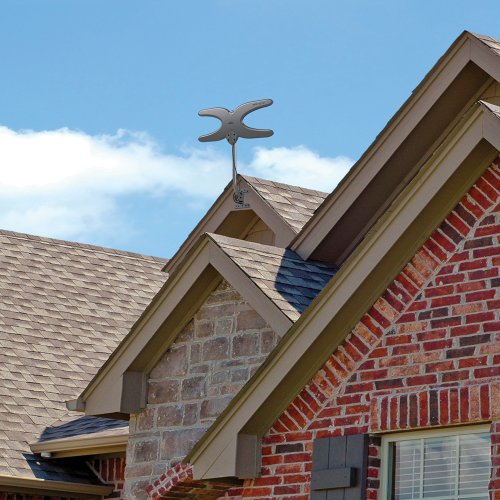
Mohu Sky 60 antenna
The Sky 60: certainly not invisible, but I think it looks a lot better than rooftop antennas of yesteryear.

I live about 50 miles from most of the transmitters in Indianapolis, so I’ve installed Mohu’s Sky 60 antenna. It’s designed to be outdoors or in an attic, but it’s far from an eyesore (in my opinion). It’s only about 3 feet high and maybe 1.5 feet wide. Since I’m near the edge of this antenna’s range, a few of the channels don’t come in cleanly, and this is made worse when storms move through the area. But we usually get FOX, CBS, ABC, and PBS in high definition, plus some secondary channels like 24/7 radar or oldies TV shows.
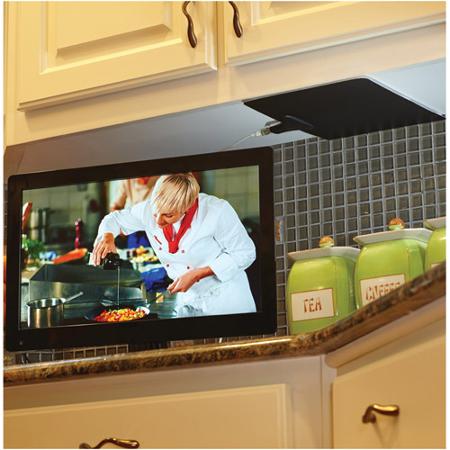
Mohu Leaf 30 antenna
The Leaf 30: very inconspicuous. Not sure why they didn’t install it with the white side facing out though!

For those of you who live closer to a city than we do, there are cheaper and less conspicuous options available. For example, Mohu’s Leaf 30 indoor antenna is about the size of a sheet of paper, only 1/16th in. thick, and can be painted to match its location. Its 30-mile range should be plenty for folks living in a city or suburbs.

I’ve had mixed results with reception at the edge of my antenna’s advertised range, but I’ve been impressed with Mohu’s customer support. There are certainly other options available for HD antennas as well.

Streaming options

If you’re a cable user, you probably have favorite shows on cable channels like History or ESPN. Well, you won’t be able to get those with your antenna. But there are ways to see many of those shows after they’ve aired.

The most common of these are streaming services Netflix and Hulu Plus. Both are monthly subscriptions, and they include episodes of current TV shows, shows that aren’t currently airing, and lots of movies. (We had Netflix for a while, but after some months decided we didn’t watch enough to justify our subscription.)

Other streaming services are also available, such as Amazon Instant Video (free to Amazon Prime members).

Roku 3
Roku 3 streaming media player

Streaming services are available directly through smart TVs or through streaming boxes like a Roku or Amazon Fire TV, which plug into your TV through an HDMI cable. Netflix and Hulu Plus are available through almost every smart TV or streaming box, but often you’ll find “channels” specific to a cable network, such as Fox News Channel. Some of these channels will require you to sign in with a cable provider, but others will let you watch recent episodes or clips for free.

Often you can also watch the most recent episodes of cable shows in full online after they’ve aired. You’ll have to keep up with them, because they usually only keep the few most recent episodes available.

Sling TV from Dish will stream certain cable channels for a monthly rate.
Sling TV from Dish

If you’re willing to pay more, there are more options coming in the months ahead for “cord-cutters.” HBO, a “premium” cable channel, recently announced it will soon allow people without cable to pay for access to its shows. In addition, Dish TV announced a new standalone service offering live streaming of cable channels such as ESPN, CNN, and Food Network for $20 per month.

Don’t forget discs

Remember when Netflix sent DVDs by mail? Well, they still do! You can sign up for a Netflix DVD or Blu-ray plan separately from a Netflix streaming subscription or along with one.

My wife and I rarely watch more than a few movies per month. For us, Redbox is also a nice option for one-night DVD rental. Redbox.com allows us to find a location nearby that has the movie we want in stock.

Free options

If going without cable is starting to sound almost as expensive as cable, don’t forget about great free options! Your local library should have plenty of choices of DVD and Blu-ray movies and TV shows available.

And of course there’s a good chance if you don’t own a movie, you might have a friend who does. We’ve often borrowed movies and TV shows from our friends, and vice versa.

Have you quit cable? What’s your setup like? Let me know below!

-Paul

Go back

Your message has been sent

Warning
Warning
Warning
Warning

Warning.

Amazon Prime: Is It For Me?

“10 to 14 days?!? I don’t have 10 to 14 days!!!”

Yes, it’s that time of year again, when an item you buy online with free shipping probably won’t get delivered before Christmas. So do you pay extra for the expedited shipping, or do you hope Uncle Larry is okay with getting his Indianapolis Colts Santa light-up hat a few days after Christmas?

If you do any of your shopping on Amazon (and who doesn’t?), you’ve surely seen the option in the checkout window for “FREE Two-Day Shipping with Amazon Prime.” As you finish your Christmas shopping, it looks very tempting. (And you can actually try it free for 30 days, which might help you get those last gifts delivered on time.)

But Amazon Prime is actually a lot more than just free two-day shipping. What does it include? And most importantly, is it for you?

Pros

Amazon Prime logo
Amazon Prime checkmark logo (Image courtesy of amazon.com)

The first and most well-known benefit to Amazon Prime is free two-day shipping on countless items on the Amazon website. Not every item is eligible, but most are, and they’re clearly indicated with the Prime checkmark icon you can see here. If you’re used to waiting over a week to get a package, you’ll be amazed how quickly your packages from Amazon arrive (and frankly two-day shipping across the country is a logistical marvel).

If you own a Kindle, you’ll also have access to borrow from Amazon’s collection of over 500,000 Kindle ebooks.[1] You can borrow a book per month, with no due date. Once you return it, you can check out another next month. (There are ways to borrow Kindle books and other ebooks through your local library, as well.)

Amazon Prime also gets you access to stream unlimited movies and TV shows through Prime Instant Video. This is similar to Netflix, so there are some well-known titles and plenty of titles you’ve never heard of. Also, there’s some content overlap with Netflix, so be aware of that if you subscribe to Netflix.

In addition to on-demand video, a Prime subscription also gets you access to Prime Music, a service that gives you access to unlimited music without ads. This is very similar to Spotify, although with a much smaller selection of music (for now) and you do get the ability to download music for offline listening.

Need more? How about unlimited cloud storage for all your photos? Prime Photos is yet another service Amazon includes for all Prime members. It allows you to upload unlimited photos to an Amazon cloud storage account. Photos add up to a lot of storage space, especially if you take them with a smartphone. Storing them in the cloud allows you to access them from anywhere you have Internet access.

Cons

These many perks aren’t exactly free: Amazon Prime costs $99 per year (a recent price increase from $79). So as you consider the many benefits mentioned above, weigh them against the up-front cost to decide if Prime is worth purchasing for your family. This works out to $8.25 per month. In comparison, a standard subscription to Netflix costs $8.99 a month.

If you’re a student, you can get some of the great benefits of Amazon Prime free for six months, namely the free two-day shipping and unlimited photo storage. After that (or instead), you can get all the benefits of Amazon Prime for half-price ($49).

Ease of use

Amazon shipping boxes
Amazon shipping boxes (Photo courtesy of amazon.com)

Free two-day shipping is easy to take advantage of with Amazon Prime. Once you’ve signed up for Amazon Prime, just buy stuff like normal and choose free two-day shipping at checkout.

Kindle books, video, music, and photo storage will depend on your familiarity with similar services. Amazon has a very helpful support section of their website, and this can ease your transition as you learn the ropes of downloading ebooks, watching movies, etc.

Is it for me?

Amazon Prime might be great for you, if:

  • You frequently purchase from amazon.com
  • You would often watch movies or TV shows or listen to music through Amazon’s streaming services
  • You take lots of photos, and often run out of storage space
  • You own a Kindle

You should probably stay away from Amazon Prime, if: 

  • You rarely use amazon.com
  • When you shop online, you are fine with free shipping that takes longer than a week
  • You have little interest in Amazon Prime’s non-shipping perks

If you have Amazon Prime, what’s been your experience?

Do you have a topic you’d like to know more about? Let me know below. Thanks!

-Paul

Go back

Your message has been sent

Warning
Warning
Warning
Warning

Warning.

1 – Kindle ebook borrowing only applies if you have a Kindle device. It won’t work with the Kindle app on an iOS or Android device.