Amazon Prime: Is It For Me?

“10 to 14 days?!? I don’t have 10 to 14 days!!!”

Yes, it’s that time of year again, when an item you buy online with free shipping probably won’t get delivered before Christmas. So do you pay extra for the expedited shipping, or do you hope Uncle Larry is okay with getting his Indianapolis Colts Santa light-up hat a few days after Christmas?

If you do any of your shopping on Amazon (and who doesn’t?), you’ve surely seen the option in the checkout window for “FREE Two-Day Shipping with Amazon Prime.” As you finish your Christmas shopping, it looks very tempting. (And you can actually try it free for 30 days, which might help you get those last gifts delivered on time.)

But Amazon Prime is actually a lot more than just free two-day shipping. What does it include? And most importantly, is it for you?

Pros

Amazon Prime logo
Amazon Prime checkmark logo (Image courtesy of amazon.com)

The first and most well-known benefit to Amazon Prime is free two-day shipping on countless items on the Amazon website. Not every item is eligible, but most are, and they’re clearly indicated with the Prime checkmark icon you can see here. If you’re used to waiting over a week to get a package, you’ll be amazed how quickly your packages from Amazon arrive (and frankly two-day shipping across the country is a logistical marvel).

If you own a Kindle, you’ll also have access to borrow from Amazon’s collection of over 500,000 Kindle ebooks.[1] You can borrow a book per month, with no due date. Once you return it, you can check out another next month. (There are ways to borrow Kindle books and other ebooks through your local library, as well.)

Amazon Prime also gets you access to stream unlimited movies and TV shows through Prime Instant Video. This is similar to Netflix, so there are some well-known titles and plenty of titles you’ve never heard of. Also, there’s some content overlap with Netflix, so be aware of that if you subscribe to Netflix.

In addition to on-demand video, a Prime subscription also gets you access to Prime Music, a service that gives you access to unlimited music without ads. This is very similar to Spotify, although with a much smaller selection of music (for now) and you do get the ability to download music for offline listening.

Need more? How about unlimited cloud storage for all your photos? Prime Photos is yet another service Amazon includes for all Prime members. It allows you to upload unlimited photos to an Amazon cloud storage account. Photos add up to a lot of storage space, especially if you take them with a smartphone. Storing them in the cloud allows you to access them from anywhere you have Internet access.

Cons

These many perks aren’t exactly free: Amazon Prime costs $99 per year (a recent price increase from $79). So as you consider the many benefits mentioned above, weigh them against the up-front cost to decide if Prime is worth purchasing for your family. This works out to $8.25 per month. In comparison, a standard subscription to Netflix costs $8.99 a month.

If you’re a student, you can get some of the great benefits of Amazon Prime free for six months, namely the free two-day shipping and unlimited photo storage. After that (or instead), you can get all the benefits of Amazon Prime for half-price ($49).

Ease of use

Amazon shipping boxes
Amazon shipping boxes (Photo courtesy of amazon.com)

Free two-day shipping is easy to take advantage of with Amazon Prime. Once you’ve signed up for Amazon Prime, just buy stuff like normal and choose free two-day shipping at checkout.

Kindle books, video, music, and photo storage will depend on your familiarity with similar services. Amazon has a very helpful support section of their website, and this can ease your transition as you learn the ropes of downloading ebooks, watching movies, etc.

Is it for me?

Amazon Prime might be great for you, if:

  • You frequently purchase from amazon.com
  • You would often watch movies or TV shows or listen to music through Amazon’s streaming services
  • You take lots of photos, and often run out of storage space
  • You own a Kindle

You should probably stay away from Amazon Prime, if: 

  • You rarely use amazon.com
  • When you shop online, you are fine with free shipping that takes longer than a week
  • You have little interest in Amazon Prime’s non-shipping perks

If you have Amazon Prime, what’s been your experience?

Do you have a topic you’d like to know more about? Let me know below. Thanks!

-Paul

Go back

Your message has been sent

Warning
Warning
Warning
Warning

Warning.

1 – Kindle ebook borrowing only applies if you have a Kindle device. It won’t work with the Kindle app on an iOS or Android device.
Google Chromebook: Is It For Me?

Welcome to the first of a recurring series here on my Making Technology Simpler blog: “Is It For Me?” I’ll explain a product or technology, then help you figure out if it meets your needs. This week’s subject is the Google Chromebook.

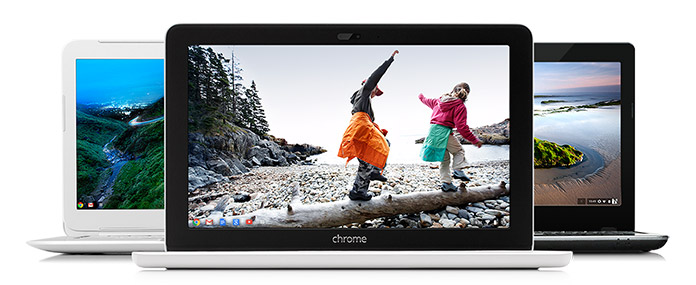
Chromebook laptops
Google Chromebooks (Photo courtesy of google.com)

Google Chromebooks are a series of inexpensive laptops with great battery life, strong integration with Google, and little maintenance needed.

Chromebooks use an operating system created by Google called Chrome OS…the whole operating system is basically the Chrome Internet browser that many people use on Windows and Mac computers. The computer hardware is made by companies like Acer and HP.

Pros

Here’s another thing that makes Chromebooks unique among laptops: the whole operating system is designed to be used with Internet access, and the hard drive in the computer is tiny.

Google intended for these computers to be used in conjunction with Google’s cloud storage, so photos will need to be stored in Google+ and documents stored in Google Drive. (I wrote about cloud storage here.) With everything stored in the cloud, there’s no need for a big hard drive. The benefit of this is the computer will boot up very quickly.

This reliance on cloud storage has a couple other ramifications. On the positive side, no data backups are needed, since almost everything is in Google’s cloud. And once the computer needs to be replaced, you can sign into your next Chromebook with your Google account, and all your emails, documents, etc. will be available immediately. No file transferring necessary.

Cons

On the flip side, you will be limited in what your Chromebook can do without Internet access. You can do some document creation, for example, and the document will save to Google Drive when you connect to the Internet again. Internet access is becoming more widespread, however, and some Chromebooks will allow you to also connect to a 4G network through a carrier like T-Mobile.

Because almost everything you do on a Chromebook involves Internet access, the speed of the computer itself will be heavily influenced by the speed of your Internet connection. If you regularly use a slow connection, be prepared to pay for faster speeds to really enjoy a speedy Chromebook experience.

The other main limitation of Chromebooks is that you can’t install PC or Mac programs on it. So if you really need the full version of Microsoft Office or some specialized accounting program for your work, a Chromebook isn’t for you (unless it’s as a secondary computer). You’re limited to using Google’s apps and others available through the Chrome web store.

Ease of use

Chromebooks are low maintenance devices, partly because they update automatically and Google says they’re very secure and have no need for antivirus software.

Setup is also easy, to the degree that you’re already part of Google’s services. If you already use Google for email, documents, photos, and music, your new Chromebook will be ready to go as soon as you open it and sign in with your Google account.

If you use iTunes for your music and store documents or photos on your current computer, you’ll want to transfer all of it to Google’s appropriate online service before you make the switch to a Chromebook. (And if you have an iPhone, iPad, or iPod, know that they won’t sync with music on your Chromebook.)

Remember, third-party apps like iTunes or Microsoft Office can’t be installed on a Chromebook. So you’ll need to use a Google service or a third-party service that can be accessed online (such as Pandora for music streaming or the online version of Microsoft Office).

Is it for me?

A Chromebook might be great for you, if:

  • You use Google for all of your email, documents, photos, media, and calendar (or are willing to move all those things to Google)
  • You have Internet access almost all the time
  • You need a very portable computer with a battery that lasts all day
  • A low up-front cost is important to you

You should probably stay away from a Chromebook, if:

  • You need an application that only runs on a PC or Mac, like Adobe Creative Cloud, Microsoft Office, or iTunes
  • You prefer to store your documents, photos, or media locally (i.e. on your computer’s hard drive)
  • Your computer needs to handle intense tasks, like games or video editing

Have you seen or heard about another device or technology that’s made you ask, “Is it for me?” Let me know below, and I’ll write about it soon.

-Paul

Go back

Your message has been sent

Warning
Warning
Warning
Warning

Warning.